
Overview
Microsoft Excel has been one of the most widely used business tools for decades. From tracking sales and inventory to managing employee data and financial reports, spreadsheets have helped businesses organize information quickly and affordably.
However, as businesses grow, Excel often becomes a bottleneck rather than a solution.
Large spreadsheets become difficult to maintain, multiple versions create confusion, manual data entry leads to errors, and teams struggle to collaborate efficiently. If your business depends heavily on Excel for day-to-day operations, it may be time to consider a more scalable solution.
Custom software is designed around your unique workflows, helping automate repetitive tasks, improve collaboration, enhance security, and provide real-time insights for better decision-making.
In this guide, we'll explore the ten biggest signs that indicate your business has outgrown Excel and why investing in custom software can help you scale with confidence.
Why Businesses Continue Using Excel for Too Long
Many businesses continue using Excel because it is familiar, affordable, and easy to start with. In the early stages of a business, spreadsheets are often sufficient for tracking sales, expenses, inventory, employee information, and customer records. For startups and small businesses, Excel provides a simple way to organize data without investing in dedicated software.
However, as operations expand, spreadsheets gradually become difficult to manage. More employees need access, data grows exponentially, reports become more complex, and manual processes consume increasing amounts of time. What once served as a convenient tool eventually turns into an operational bottleneck that slows business growth.
Businesses often continue using Excel beyond its ideal stage because switching to a new system can seem expensive, time-consuming, or complicated. Many organizations become comfortable with their existing spreadsheets and continue adding more sheets, formulas, and manual processes instead of addressing the underlying operational challenges.
Understanding when Excel has reached its limitations is the first step toward choosing a scalable custom software solution that supports long-term business success.
Why Do Businesses Keep Using Excel for So Long?
1. Excel Is Familiar and Easy to Use
One of the biggest reasons businesses continue using Excel is familiarity. Employees across different departments already understand basic spreadsheet functions, making it easy to create reports, track information, and manage daily tasks.
Unlike specialized software that requires training, Excel allows teams to start working immediately. This convenience often makes businesses delay adopting dedicated solutions, even when their operational requirements have grown.
2. Low Initial Cost
Excel is affordable compared to implementing a complete business management system. For small businesses, investing in custom software or ERP solutions may initially feel unnecessary.
Many companies think:
"Our business is still manageable with spreadsheets."
"We can upgrade when we grow bigger."
"Excel is working fine for now."
However, as the business expands, the hidden costs of spreadsheet dependency often become higher than the investment required for automation.
These hidden costs include:
Time spent on manual data entry
Errors caused by incorrect formulas
Delayed reporting
Duplicate information
Productivity loss
3. Businesses Underestimate Future Growth
Many organizations design their processes based on their current size rather than future requirements.
A spreadsheet that works for:
100 customers
50 products
5 employees
may become extremely difficult to manage when the business grows to:
10,000 customers
Thousands of products
Multiple departments
Growth increases data complexity, and Excel is not designed to handle large-scale business operations efficiently.
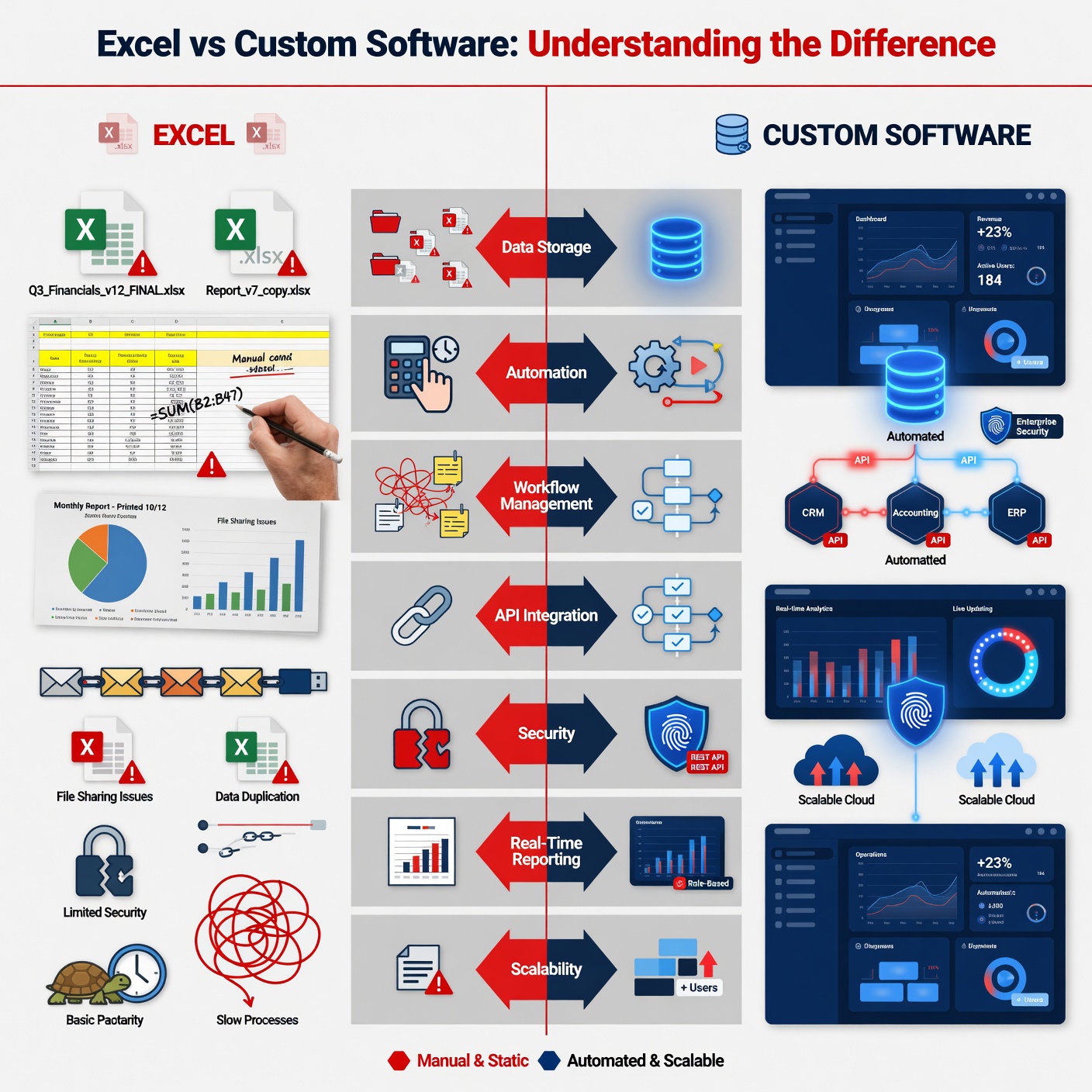
Excel vs Custom Software: Understanding the Difference
Feature | Excel | Custom Software |
Purpose | Productivity tool for managing and organizing data | Complete business operating system designed to manage operations |
Data Storage | Stores information in separate spreadsheet files | Uses a centralized database for secure data management |
Calculations | Requires manual formulas and updates | Automates calculations and business processes |
Workflow Management | Limited workflow capabilities | Automates complete business workflows |
Data Access | File-based access with version control issues | Real-time access for multiple users and departments |
API Integration | Limited connectivity with other systems | Integrates with third-party tools and platforms through APIs |
Security | Basic password and file protection | Advanced security with user roles and access controls |
Reporting | Manual reports and data analysis | Real-time dashboards and automated reports |
Scalability | Difficult to manage as business grows | Designed to support long-term business expansion |
1. Your Team Spends Too Much Time Entering Data
Manual data entry is one of the biggest productivity killers.
If employees spend hours updating spreadsheets, copying information between files, or correcting mistakes, valuable time is being wasted.
Custom software automates repetitive processes by capturing information automatically and synchronizing data across departments.
Benefits include:
Reduced manual work
Faster operations
Fewer errors
Improved productivity
2. Multiple Versions of the Same Spreadsheet Exist
Does your team regularly ask:
"Which file is the latest?"
"Who updated this?"
"Can someone send the newest version?"
This is a common problem with Excel-based workflows.
Custom software stores all information in a centralized database, ensuring everyone works with the same real-time data.
This eliminates:
Duplicate files
Version conflicts
Lost information
Confusion among teams
3. Your Business Processes Are Becoming More Complex
As companies grow, operations become more complicated.
You may need to manage:
Customers
Vendors
Inventory
Sales
Finance
Employees
Projects
Reports
Trying to connect dozens of spreadsheets usually creates inefficiencies.
Custom software combines all these processes into one integrated platform.
4. Reporting Takes Hours Instead of Minutes
Many businesses spend days preparing weekly or monthly reports.
Employees manually gather information from different spreadsheets before creating dashboards.
Custom software automatically generates reports using live business data.
You can instantly monitor:
Sales performance
Revenue
Inventory
Customer activity
Employee productivity
Financial trends
This enables faster and more informed decision-making.
5. Collaboration Is Becoming Difficult
Excel wasn't built for large collaborative teams.
When multiple employees edit spreadsheets simultaneously, businesses often experience:
Data conflicts
Missing information
Accidental deletions
Duplicate records
Custom software provides secure multi-user access with role-based permissions, allowing departments to collaborate seamlessly without compromising data integrity.
6. You're Worried About Data Security
Business data is one of your most valuable assets.
Excel files stored on local computers or shared drives are vulnerable to:
Unauthorized access
Accidental deletion
Data corruption
Malware attacks
Custom software offers enterprise-grade security features, including:
User authentication
Role-based permissions
Data encryption
Automatic backups
Audit logs
These features help protect sensitive business information.
7. Your Business Uses Multiple Software Tools That Don't Communicate
Many organizations rely on separate systems for accounting, CRM, payroll, inventory, and customer support.
Employees often transfer information manually between these tools.
Custom software integrates with third-party platforms using APIs, creating a connected ecosystem where data flows automatically.
This reduces duplication and improves operational efficiency.
8. Customer Service Is Slowing Down
When customer information is scattered across spreadsheets, employees spend valuable time searching for details.
This can lead to:
Delayed responses
Missed follow-ups
Inconsistent service
Lower customer satisfaction
Custom software centralizes customer information, enabling teams to access records instantly and provide faster, more personalized support.
9. Excel Is Limiting Business Growth
Spreadsheets may work for small businesses, but they become increasingly difficult to manage as your organization expands.
Growth often introduces:
More employees
More customers
More transactions
More locations
More products
Custom software is designed to scale with your business, allowing you to add users, features, and integrations without disrupting operations.
10. You Need Better Business Insights
Successful businesses rely on data-driven decisions.
If your team struggles to analyze trends because information is spread across multiple spreadsheets, you're missing valuable opportunities.
Custom software provides:
Real-time dashboards
KPI tracking
Predictive analytics
Performance reports
Business intelligence tools
These insights help leaders identify opportunities, reduce risks, and improve profitability.
Common Problems Businesses Face When Relying on Excel
Many businesses start with Excel because it is simple and affordable. However, as operations expand, spreadsheets often become difficult to manage. Increasing data, multiple users, and growing business processes expose the limitations of Excel.
1. Version Confusion
When multiple employees work on different Excel files, businesses often face confusion about which version contains the latest information.
Common issues:
Duplicate files
Outdated data
Incorrect updates
Difficulty tracking changes
2. Broken Formulas and Data Errors
Excel depends heavily on manual formulas. A small mistake while editing a spreadsheet can impact entire calculations.
Problems include:
Incorrect reports
Calculation mistakes
Time spent fixing errors
Unreliable business data
3. No Proper Audit Trail
Excel does not provide a complete record of business activities.
Businesses cannot easily track:
Who changed the data
When changes were made
Why information was modified
This creates transparency and accountability issues.
4. Lack of Workflow Automation
Excel only stores information; it does not manage business processes.
It cannot automate:
Task assignments
Follow-ups
Order processing
Employee workflows
Employees must handle these activities manually.
5. No Approval Management
Growing businesses require approval systems for:
Expenses
Purchases
Leave requests
Business decisions
Excel does not provide built-in approval workflows, making processes slower.
6. No Automated Notifications
Businesses often miss important updates because Excel cannot automatically send alerts.
Examples:
Payment reminders
Stock alerts
Task deadlines
Customer follow-ups
7. Limited Mobile Accessibility
Modern businesses need access to information anytime and anywhere.
Excel files often create challenges with:
Mobile editing
Real-time updates
Team collaboration
8. No Real-Time Dashboards
Business leaders need instant insights to make better decisions.
With Excel, teams spend time manually preparing:
Sales reports
Performance reports
Financial analysis
Custom software provides live dashboards with real-time data.
9. Weak Data Security
Sensitive business information stored in spreadsheets can face security risks.
Challenges include:
Unauthorized access
File sharing issues
Lack of user permissions
Data loss risks
10. Poor Scalability
Excel may work for small operations, but it becomes inefficient as businesses grow.
Large organizations need systems that can handle:
More users
More data
Multiple departments
Complex processes
Benefits of Switching to Custom Software
As businesses grow, traditional tools like spreadsheets and manual processes become difficult to manage. Switching to custom software solutions helps organizations automate operations, improve efficiency, and build scalable systems according to their specific requirements.
1. Automation of Business Processes
Custom software eliminates repetitive manual tasks by automating daily operations.
Benefits include:
Faster workflows
Reduced manual effort
Fewer operational delays
Improved employee productivity
Businesses can automate processes like billing, inventory updates, reporting, customer follow-ups, and approvals.
2. Improved Accuracy
Manual data entry often leads to mistakes and inconsistencies.
Custom software improves accuracy by:
Automating calculations
Reducing human errors
Maintaining consistent data
Providing reliable reports
Accurate information helps businesses make better decisions.
3. Better Scalability
Custom software grows with your business.
Unlike spreadsheets or basic tools, it can support:
More users
More customers
Increased data
Additional business operations
A scalable solution helps businesses expand without changing their entire system.
4. Enhanced Security
Business data requires strong protection.
Custom software provides:
User access controls
Data encryption
Secure databases
Backup systems
Activity tracking
This helps protect sensitive customer, financial, and operational information.
5. Improved Collaboration
Custom software connects different teams through a centralized platform.
Employees can:
Access updated information
Work together efficiently
Share data in real time
Reduce communication gaps
Better collaboration improves overall productivity.
6. Real-Time Reporting and Analytics
Custom software provides instant access to important business insights.
Businesses can track:
Sales performance
Customer trends
Inventory status
Employee productivity
Financial reports
Real-time reporting helps management make faster and smarter decisions.
7. Business Intelligence
Modern custom software can include advanced analytics and business intelligence features.
It helps businesses:
Identify growth opportunities
Understand customer behavior
Predict future trends
Improve strategic planning
Data-driven decisions give businesses a competitive advantage.
8. Seamless Integration
Custom software can connect with existing business tools and platforms.
Integration options include:
Payment gateways
CRM systems
ERP platforms
Third-party applications
APIs
This creates a connected digital ecosystem for smoother operations.
9. Better Compliance Management
Businesses must follow industry regulations and maintain accurate records.
Custom software helps with:
Data tracking
Documentation
Automated reports
Secure record management
This makes compliance easier and reduces risks.
10. Better Customer Experience
Custom software improves customer interactions by providing faster and more personalized services.
Benefits include:
Quick response times
Better communication
Personalized services
Easy access to information
A better customer experience helps increase satisfaction and loyalty.
Why Custom Software Is Better Than Excel
Excel | Custom Software |
Manual data entry | Automated workflows |
Multiple file versions | Centralized database |
Limited collaboration | Multi-user access |
Basic reporting | Real-time dashboards |
Difficult integrations | API connectivity |
Limited security | Enterprise-grade security |
Hard to scale | Built for business growth |
Static spreadsheets | Intelligent automation |
Industries That Benefit from Custom Software
Almost every industry can improve efficiency by replacing spreadsheet-based processes with custom software.
Examples include:
Manufacturing
Retail
Healthcare
Hospitality
Education
Logistics
Finance
Construction
Real Estate
Professional Services
Whether you're managing inventory, employee records, customer relationships, or financial operations, custom software helps streamline workflows and improve productivity.
How Mega Tech Bot Pvt. Ltd. Helps Businesses
At Mega Tech Bot Pvt. Ltd., we develop custom software solutions tailored to the unique needs of every business. Instead of forcing your team to adapt to generic software or complex spreadsheets, we build applications that match your workflows and business goals.
Our expertise includes:
Our development approach focuses on scalability, security, performance, and user experience, ensuring your software grows alongside your business.
Frequently Asked Questions
Is Excel suitable for small businesses?
Yes. Excel is a great starting point for businesses with simple processes and limited data. However, as operations become more complex, custom software offers better efficiency and scalability.
When should I switch from Excel to custom software?
Consider upgrading when manual work increases, collaboration becomes difficult, reporting takes too long, or your business requires automation and real-time insights.
Is custom software expensive?
The cost depends on your business requirements, but the long-term benefits—such as improved productivity, reduced errors, and better decision-making—often deliver a strong return on investment.
Can custom software integrate with my existing tools?
Yes. Modern custom software can integrate with accounting systems, CRMs, payment gateways, ERP platforms, cloud services, and other third-party applications.
Is custom software secure?
Yes. Custom software can include advanced security features such as encrypted data storage, role-based access control, secure authentication, automated backups, and audit logs.
How long does custom software take?
The development time depends on features, complexity, and business requirements. Simple applications may take weeks, while larger systems may require months.
Can software grow with my business?
Yes. Custom software can be scaled with your business by adding new features, users, integrations, and modules as your requirements increase.
Who owns the source code?
Source code ownership depends on the project agreement. Businesses can own the source code if it is included in the development contract.
Can old Excel data be migrated?
Yes. Existing Excel files can be migrated into custom software, including customer data, inventory, sales records, and other business information.
Can custom software integrate with Tally?
Yes. Custom software can integrate with Tally to sync accounting data, invoices, transactions, and financial reports.
Can it integrate with WhatsApp?
Yes. WhatsApp integration allows businesses to send notifications, reminders, updates, and customer messages automatically.
Can it integrate with payment gateways?
Yes. Custom software can connect with payment gateways to support online payments, digital receipts, and transaction tracking.
How much maintenance is required?
Regular maintenance includes security updates, bug fixes, performance improvements, backups, and adding new features when required.
Is It Time to Replace Excel?
Excel is a useful tool for managing basic business tasks, but as operations grow, spreadsheets can become difficult to manage. If your business is facing multiple data issues, manual processes, or collaboration challenges, it may be time to consider a custom software solution.
Quick Checklist: Are You Ready to Move Beyond Excel?
1. Managing multiple spreadsheets for different departments
2. Creating reports manually every time
3. Employees doing duplicate data entry work
4. Concerned about data security and access control
5. Managing multiple branches or locations
6. Facing slow approval processes
7. Experiencing inconsistent or incorrect data
8. Finding team collaboration difficult
9. Business operations are growing rapidly
10. Relying on manual workflows and follow-ups
If you answered "Yes" to three or more of these questions, your business has likely reached the point where custom software will provide a significant operational advantage.
Conclusion
Excel remains a valuable tool for organizing data, but it isn't designed to manage the growing complexity of modern businesses. As your organization expands, relying on spreadsheets can lead to inefficiencies, errors, security risks, and limited visibility into your operations.
Custom software addresses these challenges by centralizing data, automating workflows, improving collaboration, and providing real-time insights that support smarter business decisions.
If your business is experiencing any of the signs discussed in this article, now is the right time to evaluate whether a custom software solution can help you work more efficiently and prepare for future growth.
At Mega Tech Bot Pvt. Ltd., we specialize in building secure, scalable, and customized software solutions that empower businesses to streamline operations, increase productivity, and achieve long-term success in an increasingly digital world.
Also Read
The Future of Enterprise Software: AI, Cloud & Automation Transforming Businesses in 2026